Learn ProcureTrail
Short, focused videos covering procurement, assets, accounting and access control — from a single purchase followed end to end, down to the setup detail. Watch and follow along.
The demo library is also on our YouTube channel — @ProcureTrail.
Start Here
One purchase, followed from request through to the books. Watch the full journey, or the two-minute version.

One Governed Journey
A requisition approved level by level, a purchase order carrying vendor and pricing forward, a goods receipt recording what actually arrived, assets created with their own IDs, and the accounting vouchers queued for Tally. Nothing retyped along the way.

ProcureTrail in 2 Minutes
The same story as a short montage — the moments that matter across procurement, assets, accounting and access control, without the step-by-step.
The Procurement Journey
Requisition to purchase order to receipt — and what happens when something does not match.

Requisition Approval — Maker-Checker, Level by Level
A requisition moves only through its approval matrix. Level 1 approves, Level 2 approves, and only then does the status change — with every step written to the workflow history as it happens. No skipped levels, no self-approval.

Three-Quotation Comparison
Three vendors side by side with basic, GST and total, the selection and its reason on the record. An approver may attach a counter-check quote and it is logged; an attempt to edit the comparison table is refused. Once approved, the comparison is sealed and the purchase order inherits it read-only.

Purchase Orders & Goods Receipt
Purchase orders generate from approved requisition lines, with vendor and pricing carried forward rather than re-entered. Goods receipts record what actually arrived, line by line, and a posted receipt is the moment goods become accountable.

Invoice Mismatch Control & Reversals
An invoice arrives above the purchase-order rate and the receipt catches it, per line. Accepting the invoice price is itself a decision that needs a second approver — and when a posted document is wrong it reverses through a compensating document. The original is never edited or deleted.

Vendor Debit Notes & Rejected Goods Recovery
When goods fail, the recovery paperwork follows them back out. A rejected delivery prices its own debit note — basic value plus GST, split correctly — approved as a workflow and exportable as a PDF for the vendor. The physical pickup is recorded too, and a register shows what is still pending collection.
Assets & the Register
Where assets come from, how they leave, and how an existing register comes across.

Asset Register & Physical Verification
Assets are created from receipts rather than typed in — each with a generated ID, a keeper, and its own record of contracts, service and depreciation. Physical verification runs as scoped campaigns, so the register and the floor stay honest with each other.

QR Tagging & Physical Verification — the Assets-Only Pattern
A three-minute walkthrough of an organisation that keeps values in its ERP — the register runs without amounts on screen, by configuration, and carries full values when you want it to. A spreadsheet row of quantity 30 becomes thirty individually-trackable assets; QR tags print on an office laser and any phone reads them; verification demands a live photo taken inside the app with GPS, each photo carrying a fingerprint hash; and while a count is running, an unverified asset cannot be retired on paper.

Asset Lifecycle — Depreciation, Exits & Year-End Close
An asset leaves only through a workflow. A scrap request clears two approval levels, every asset carries its depreciation class and rate, and the year itself closes formally — readiness checked first, with open workflows flagged before anything locks.

Asset Transfers Between Departments — Approved by the Sender, Accepted by the Receiver
Moving an asset is a governed document, not an edit. One serialized laptop leaves IT for Operations: the sending side approves the release level by level, the document turns to the receiving side for its own approval round, and only the original requester can post it. The old row closes with its history intact and the new row carries the same serial identity onward, full value aboard.

Asset Disposal with Sale Proceeds — a Governed Exit, Never a Delete Key
Disposing of an asset is a governed document. A laptop at end of life is sold to a refurbisher: the disposal request carries the sale consideration and the invoice reference, walks two approval levels, and only the requester can post it. The register row closes as Inactive — date, method, proceeds and the sale invoice an auditor can walk back to — and both journals follow.

Migrating an Existing Register
Already keep the register in a spreadsheet? It comes in as a file, validated row by row before anything is written. One broken row is pinpointed with the exact field and rule and fails alone — the valid rows go ahead. Migration mode leaves your books untouched until you are ready.

Fixed Asset Register & Companies Act Depreciation
Depreciation is computed under Schedule II, posted to Tally as a journal, and locked once the financial year closes — so a closed year's figures do not move when a new asset is added or an old one corrected.

Fixed Assets for Real Estate
Land, buildings, their significant components and later improvements tracked as their own asset lines under Ind AS 16 — so a building's structure and its lift or HVAC system can each depreciate on their own useful life.
For Your Accounts Team
How activity becomes accounting entries — including freight, imports and services.

Tally Integration & the GST Voucher Queue
Every posting event is prepared as an accounting voucher and queued for Tally, with GST carried through and entries validated against your ledger masters before they are sent. When the accounting machine is offline nothing is lost — entries hold visibly in the queue, with the reason on screen, and post when Tally returns.

Freight & Landed Cost Capitalisation
Freight belongs on the asset, not lost in expenses. The transporter's bill enters as its own governed expense purchase order, links to the goods receipt with an automatic proportional split, and lands on the asset the moment the receipt posts — with a cost breakdown naming every component and the document it came from.

Import Purchases & Bill of Entry
The Bill of Entry as a first-class record: port, transport and per-HSN duty lines, with totals computed from the lines. The import order carries its foreign currency and declared exchange rate, the receipt pins every line to its Bill of Entry line, and the posting preview shows every journal before anything is written.

Service Purchases & the Expense Register
No goods to receive, the same governance. Services are accepted through the same approval rails as goods receipts, and every service expense lands in one register with its GST and TDS breakdown, netted by month, quarter and year, and exportable to CSV.

Tally Integration, End to End
The full path from an approved purchase order to the voucher landing in Tally's Day Book — GST carried through and every entry validated against live Tally ledgers before it is written.

Capital Work in Progress
Cost collected against a project and its work orders stays out of the books as capital work-in-progress until one approved capitalisation step turns it into a fixed asset, distributed to the paisa across one or more assets.

Intangibles & Goodwill
Goodwill and other intangibles carry their own classification, separate from depreciable fixed assets. An AS org amortises them on a schedule, while an Ind AS org skips amortisation for goodwill and indefinite-life intangibles and instead surfaces an annual impairment test as due. Impairment runs the cash-generating-unit waterfall: recoverable amount tested against carrying value, goodwill absorbing the loss first, and the remainder spreading pro-rata across the unit.
For Your Auditor
Who did what, who was allowed to, and who you buy from.
Audit Trail & Approval Analytics
Every action in the system logged with actor, timestamp and the changed data — searchable by action, user and date. The same trail follows each record as its own workflow history, and feeds approval analytics and supplier performance reports.

Role-Based Access Control
Every user in their own lane. A user's menu is their permission set — and typing an admin URL directly returns a real access-denied, because every request is re-checked at the server. Who may approve what is a configured matrix, and self-approval is blocked by design for everyone.

Vendor Master & GST Details
One vendor record across purchase orders, receipts and debit notes — GSTIN, PAN, MSME classification and TDS applicability tracked centrally, with tiers and a report that shows who you actually buy from.
Setup & Onboarding
First-time configuration, step by step. These were recorded earlier than the videos above, so some screens look a little different.

1. Login & the Dashboard
Sign in and read the estate at a glance: requisitions by status, pending approvals, mismatches awaiting action, and the asset counters.

2. Organisation Setup — Basic Details
Entering the organisation's basic details during setup.
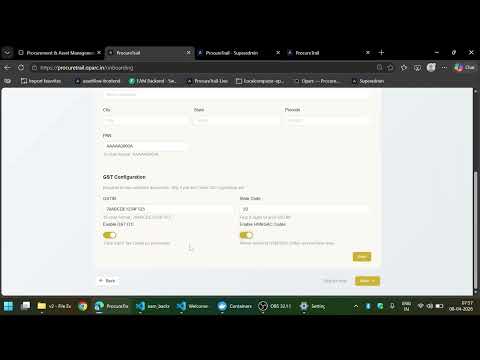
3. Organisation Setup — GST Details
Enter GST details so GST splits and the automation that follows work correctly.

4. Tally Integration, Departments & Gate Entry
Choose Tally integration if required, set your domain name, add or edit departments, and configure gate entry checks.

5. Customising Label Headings
Customise field labels to match your organisation's terminology — campus, ward, plant, or whatever you call it.
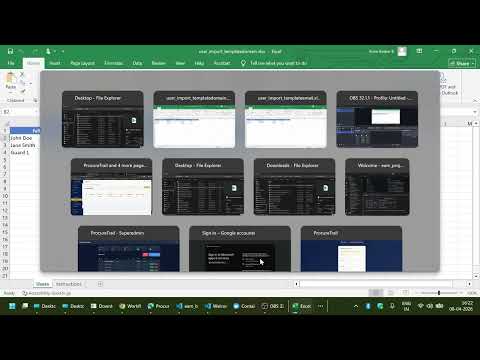
6. Add Users & Assign Roles
Add new users and assign roles to them, once access control is understood.

7. Add Approval Matrix Rows
Add approval matrix rows so requisitions and orders route to the right approvers.

8. Resetting Password & Verifying Email
Admin sets their own password during login, while other users can reset theirs on first login. Verify email addresses to receive notifications from the tool.

9. Requisition & Purchase Order Options
Choose how to approve requisitions — per line or collectively. Control when purchase orders are raised, after all lines are approved or independently. Use bypass PO for emergency purchases.

10. System Configuration & TDS Setup
Before creating a purchase order, set up TDS sections and compensation cess. Also shows the link between the setup wizard and system configuration.

11. Creating & Approving a Vendor
Create and approve a vendor, track expiring documents, add multi-location addresses with different GSTINs, and see how interstate and intrastate GST splits are handled.
Ready to Get Started?
See the platform in action, then talk to us about an engagement tailored to your organisation.
Book a Consultation How an Engagement Works